
Finding an honest Designrr review isn’t easy.
Most reviews either repeat the sales page or list every feature without showing what it’s actually like to use the software. So instead of relying on marketing claims, I decided to test Designrr myself.
I created a real ebook from scratch using WordGenie AI, edited it inside Designrr’s visual editor, tested its templates, and exported the finished ebook to see whether it could genuinely replace the combination of Google Docs, Canva, and hours of manual formatting.
The AI generated my first draft in about five minutes.
That was impressive.
But it wasn’t what impressed me the most.
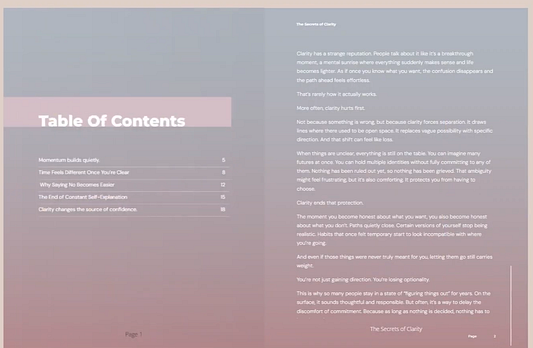
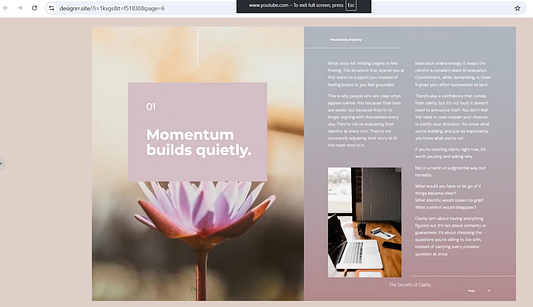
The biggest surprise was how much time Designrr saved on formatting. It automatically created chapter pages, a table of contents, page numbers, and consistent typography — turning a rough draft into something that looked like a professionally formatted ebook with very little effort.
That doesn’t mean it’s perfect.
The AI still needs editing before I’d publish anything, the pricing can be confusing because of the different plans and lifetime offers, and some features are only available in higher-tier versions.
I’ll cover all of that in this review.
By the end, you’ll know:
- Whether Designrr is actually worth buying
- Which plan offers the best value
- Where it genuinely saves time
- Where it falls short
- Whether the $27 lifetime deal is enough or if upgrading makes sense
If you’re creating ebooks, lead magnets, or other digital products, I think the Standard lifetime plan is the best place to start. I’ll explain exactly why throughout this review.
Designrr Review: My Quick Verdict
If you’re looking for software that writes an entire ebook perfectly with one click, Designrr probably isn’t what you’re looking for.
If you’re looking for software that gets you 80–90% of the way there and removes hours of formatting work, I think it does an excellent job.
After using it myself, I came away thinking Designrr’s biggest strength isn’t WordGenie AI.
It’s formatting.
The AI generated a usable first draft in about five minutes, but I still rewrote sections, adjusted headings, and checked facts before I’d consider publishing it. That’s simply the reality of AI writing today.
The real time saver came afterwards.
Instead of manually creating chapter pages, fixing heading styles, building a table of contents, adding page numbers, and trying to make everything look consistent inside Google Docs, Designrr handled almost all of that automatically.
That’s the part I found genuinely valuable.
Another thing I liked is that you’re not forced into using AI.
If you’ve already written blog posts, Google Docs, reports, or even existing ebooks, you can import them directly into Designrr and let the software handle the presentation instead of starting from scratch again.
For content creators, that’s arguably just as useful as WordGenie itself.
That said, there are a few things I’d want buyers to know before purchasing.
The pricing structure isn’t immediately obvious because Designrr sells monthly subscriptions, lifetime licenses, and optional upgrades. It’s easy to assume every feature belongs to every version when that isn’t always the case.
I’ll break all of that down later.
For now, here’s my recommendation.
If your primary goal is creating PDF ebooks, lead magnets, checklists, guides, or other downloadable digital products, I think the Standard lifetime plan offers the best balance between price and functionality.
Only look at the higher plans if you already know you’ll need additional publishing formats, transcription features, or the more advanced AI tools.
How I Tested Designrr
Whenever I research software, I always ask myself the same question:
“Would I actually use this after the review is finished?”
The only way to answer that is to build something real.
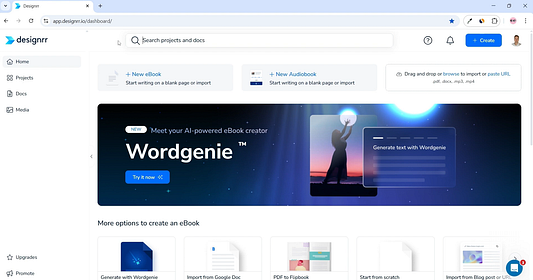
So instead of importing an existing document, I started with a completely blank project and let WordGenie generate an ebook from scratch.
From there I worked through the entire process exactly as a new customer would.
I reviewed the AI-generated outline, created the first draft, tested the template library, customized the design, edited the content inside the visual editor, and finally exported the finished ebook.
Along the way I paid attention to the things that actually matter when choosing ebook software.
Not how many features appear on the sales page.
But questions like:
- Does the AI save real time?
- Is the editor frustrating to use?
- Do the templates actually look professional?
- Can you create a presentable ebook without design experience?
- Does the exported file look the same as it did inside the editor?
Those are the things that determine whether software becomes part of your workflow or gets forgotten after a week.
One important point worth mentioning is that I tested Designrr using a higher-tier version.
Throughout this review, though, I’ve intentionally separated what I personally tested from what’s included in each plan because those aren’t always the same thing.
A lot of reviews simply list every feature Designrr offers.
I don’t think that’s particularly helpful.
If a feature only exists in Premium, someone buying the Standard lifetime plan should know that before spending any money.
That’s why later in this review I’ll compare the Standard, Pro, and Premium versions side by side so you know exactly what you’re getting.
What Is Designrr?
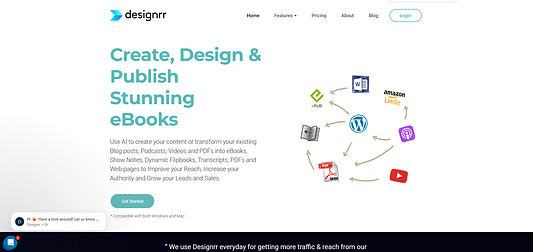
At its core, Designrr is software for creating professionally formatted ebooks.
You can either generate content with AI, import something you’ve already written, or repurpose existing material into a polished ebook without manually formatting every page yourself.
On paper that doesn’t sound very different from Google Docs or Canva.
After using it, though, I don’t think that’s really the comparison.
Google Docs helps you write.
Canva helps you design.
Designrr sits somewhere in the middle.
Its job isn’t to give you unlimited creative freedom.
Its job is to take raw content and make it look like a finished publication with as little manual work as possible.
That’s an important distinction because it’s also where Designrr delivers the most value.
I expected WordGenie to be the highlight of the software.
Instead, the formatting impressed me more.
Watching an ordinary block of text turn into something with consistent chapter pages, typography, spacing, page numbers, and a proper table of contents took much less effort than I expected.
That’s what separates Designrr from simply writing an ebook inside a word processor.
What Can You Create?
Depending on the version you’re using, Designrr supports creating and publishing:
- PDF ebooks
- Lead magnets
- Reports
- Guides
- Checklists
- EPUB ebooks
- Kindle-ready books
- Interactive flipbooks
- HTML publications
- Audiobooks
Not every export format is available in every plan, which is something I’ll explain in the pricing section later.
Where Does the Content Come From?
One thing I appreciated immediately is that Designrr doesn’t force you into an AI workflow.
If you’ve already created content elsewhere, you don’t have to generate it all over again.
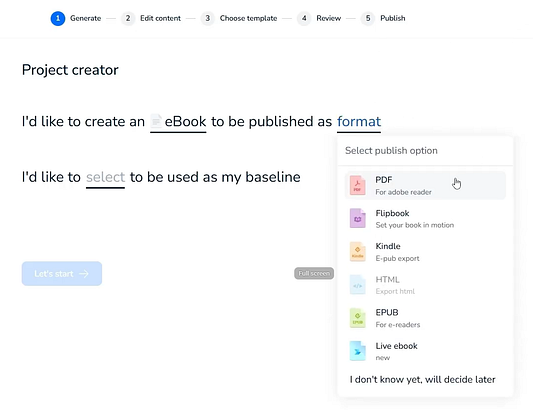
You can import content from sources including:
- Microsoft Word
- Google Docs
- PDF files
- Blog posts
- Websites
- Existing text
- WordGenie AI
- Audio and video (supported plans)
That makes Designrr just as useful for repurposing content as it is for creating something entirely new.
If you already have blog articles, YouTube scripts, training material, or older lead magnets sitting on your computer, Designrr gives you a much faster way to package them into a professional-looking ebook than rebuilding everything manually.
And that’s honestly where I think many people will get the most value.
Who Is Designrr For?
One thing that became clear after using Designrr is that it isn’t trying to be an all-purpose design platform.
It has a very specific job.
Take written content — whether that’s an AI-generated draft, a Google Doc, a blog post, or an existing ebook — and turn it into a professional-looking publication as quickly as possible.
If that’s your workflow, Designrr makes a lot of sense.
If it isn’t, there are probably better tools available.
Designrr Is a Great Fit If You…
After testing the complete workflow, I think Designrr is particularly well suited for:
- Digital product creators
- Coaches and consultants
- Bloggers
- Content marketers
- YouTubers creating downloadable resources
- Course creators
- Agencies producing client ebooks
- Small businesses building lead magnets
What all of those have in common is one thing:
They already create content.
Designrr isn’t trying to replace that process.
It’s trying to package that content into something people actually want to download, read, or buy.
For example, if you’ve already written ten blog posts about a topic, you don’t necessarily need AI to create another ebook.
Import the articles.
Clean them up.
Apply a template.
Export the finished PDF.
That’s a workflow I think many creators will use far more often than generating ebooks entirely from scratch.
Designrr Probably Isn’t for You If…
Just because I like Designrr doesn’t mean I’d recommend it to everyone.
I’d probably look elsewhere if:
- You want complete creative control like Adobe InDesign.
- Most of your work revolves around graphic-heavy layouts rather than text.
- You’re expecting AI to create a finished ebook with no editing.
- You only need to make one ebook and don’t expect to create another.
None of those are flaws.
They’re simply outside Designrr’s intended purpose.
It was built to help creators produce clean, professional ebooks quickly — not to become a full publishing suite or graphic design application.
My Take
Before using Designrr, I assumed WordGenie would be the reason people bought it.
After using it, I don’t think that’s true.
The AI is useful.
The formatting is what makes the software worth paying for.
Once you’ve spent time manually fixing headings, spacing, page breaks, page numbers, and tables of contents inside Google Docs, you begin to appreciate how much repetitive work Designrr quietly removes.
For creators producing ebooks regularly, I think that’s where most of the value comes from.
How Designrr Works
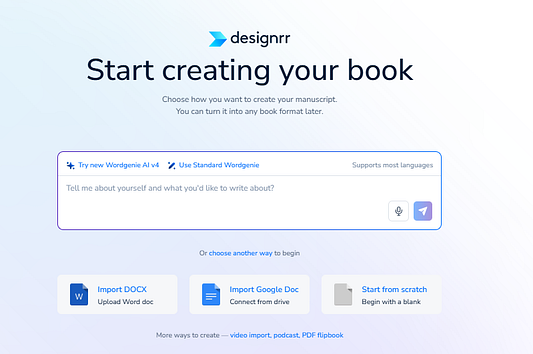
Although Designrr includes quite a few features, the overall workflow is surprisingly simple.
Instead of overwhelming you with dozens of settings, it guides you through a series of logical steps.
Even if you’ve never created an ebook before, it’s difficult to get lost.
Here’s the workflow I followed during my test.
Step 1: Start a New Project
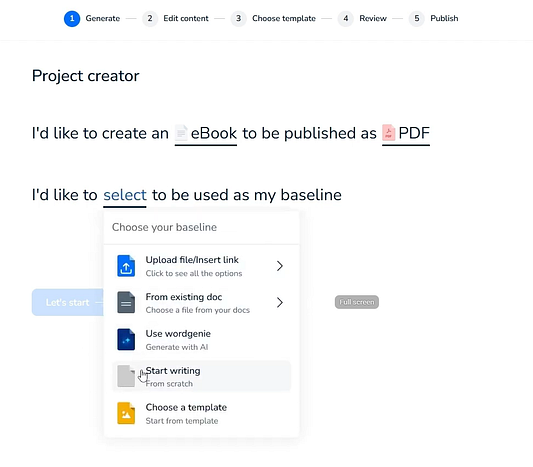
Everything begins by choosing the type of publication you want to create.
Depending on your plan, you’ll see options such as:
- PDF ebooks
- EPUB
- Kindle
- Interactive flipbooks
- HTML publications
- Audiobooks
Most people — including me — will probably choose PDF.
That’s the format I use for lead magnets, downloadable guides, and digital products, and it’s also where I think Designrr delivers the most value.
Step 2: Choose Your Content Source
Next, Designrr asks where your content will come from.
This is one of the reasons I enjoyed using it.
Instead of forcing everyone into an AI workflow, it supports several different starting points.
You can:
- generate an ebook with WordGenie,
- import a Word document,
- import Google Docs,
- upload a PDF,
- import a webpage,
- paste existing text,
- or use supported audio and video sources.
That flexibility means Designrr works equally well whether you’re creating something new or repurposing content you’ve already invested time writing.
Step 3: Generate or Import Your Content
For this review, I deliberately chose the harder option.
Instead of importing an existing document, I wanted to see how capable WordGenie actually was.
The setup process asks for more than a single AI prompt.
You’ll enter your topic, audience, writing style, title, and a few other details before generation begins.
I actually preferred this approach.
Giving the AI more context generally produces a better starting point than simply typing “write me an ebook.”
Step 4: Review Before Generating
One small feature I wasn’t expecting — but really liked — is that WordGenie shows you the proposed outline before generating the ebook.
Rather than immediately writing thousands of words, it first asks:
“Is this the structure you want?”
That saves a surprising amount of editing later.
It’s much easier to remove or reorganize chapters before the AI starts writing than after you’ve generated twenty pages of content.
Step 5: Edit the Ebook
Once the draft is ready, Designrr opens the visual editor.
This is where you’ll spend most of your time.
You’ll rewrite sections.
Replace AI wording.
Add images.
Adjust headings.
Change colors.
Update fonts.
Refine the layout.
In other words, this is where the ebook becomes yours instead of simply AI-generated.
Step 6: Export
Finally, export the finished ebook.
Depending on your plan, you’ll have access to different publishing formats.
For me, PDF was the obvious choice because that’s what I normally create.
If your workflow includes Kindle publishing, EPUB, flipbooks, or audiobooks, you’ll want to pay closer attention to which plan includes those exports.
Overall, I found the workflow refreshingly straightforward.
Every step naturally led into the next one, and at no point did I feel overwhelmed by menus or unnecessary settings.
Creating an Ebook With WordGenie AI
WordGenie was the feature I was most curious about before testing Designrr.
AI ebook generators often promise a lot, but the results are usually hit or miss.
So instead of importing existing content, I decided to let WordGenie build an ebook from scratch.
Overall, I came away pleasantly surprised.
Not because it produced a publish-ready ebook.
It didn’t.
But because it produced a much better starting point than I expected.
Step 1: Tell WordGenie What You’re Creating
The process starts with a short setup.
You’ll enter information like:
- ebook topic,
- target audience,
- title,
- writing direction.
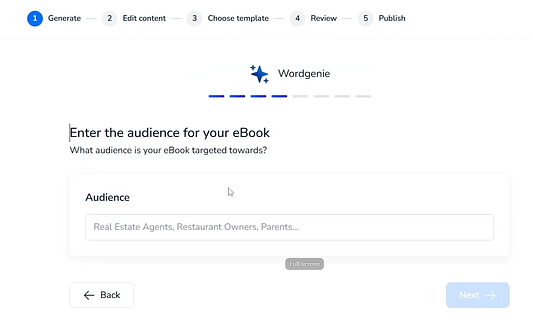
Compared with AI tools that simply ask for one prompt, this felt much more structured.
The extra information gives WordGenie a better understanding of what you’re trying to produce before it starts writing.
Step 2: Review the Outline
Before generating the ebook, WordGenie builds an outline.
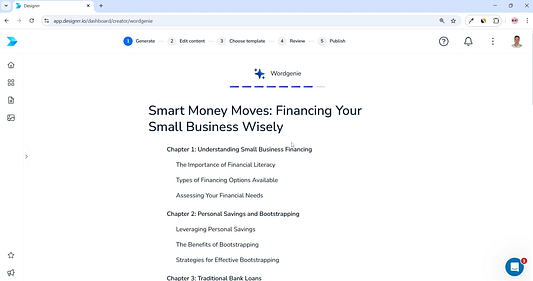
This ended up being one of my favorite parts of the workflow.
Instead of committing immediately to a full draft, you can first decide whether the proposed chapter structure actually makes sense.
If something looks repetitive or a topic is missing, it’s far easier to fix the outline now than rewrite the finished ebook later.
It’s a simple feature, but one that genuinely improves the quality of the first draft.
Step 3: Generate the First Draft
Once I approved the outline, WordGenie generated the ebook.
The entire process took roughly five minutes.
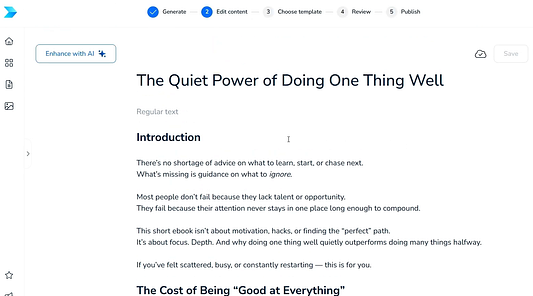
Was it perfect?
No.
But it also wasn’t the generic wall of AI text I half expected.
The chapters followed a logical sequence.
The structure was coherent.
The ebook already felt organized.
More importantly, I wasn’t staring at a blank page anymore.
That’s where I think WordGenie provides the most value.
It removes the hardest part of writing:
Getting started.
Don’t Expect One-Click Publishing
This is probably the biggest misconception surrounding AI writing software.
WordGenie creates a first draft.
It does not create a finished ebook.
During editing I still:
- rewrote awkward sentences,
- removed repetition,
- improved headings,
- checked facts,
- and made the writing sound more natural.
I don’t consider that a weakness unique to Designrr.
I’d do exactly the same thing with content generated by ChatGPT, Claude, or Gemini.
AI accelerates the first draft.
It doesn’t replace editing.
AI Isn’t Your Only Option
One thing I appreciate is that Designrr never forces you to use WordGenie.
If you’ve already written content elsewhere, simply import it.
For many creators — including bloggers and YouTubers — that may actually become the primary workflow.
Generate content when you need to.
Reuse existing content when you don’t.
Having both options makes Designrr far more flexible than software that’s built entirely around AI.
Templates and Ebook Design Quality
Creating the content is only half the job.
If the finished ebook still looks like a plain Word document, most readers won’t care how quickly it was generated.
That’s why I was interested to see whether Designrr’s templates actually looked professional or simply added a different font and a few colors.
Overall, I thought the results were better than I expected.
You Start With a Professional Foundation
Instead of opening a blank document, Designrr gives you a collection of ready-made ebook templates.
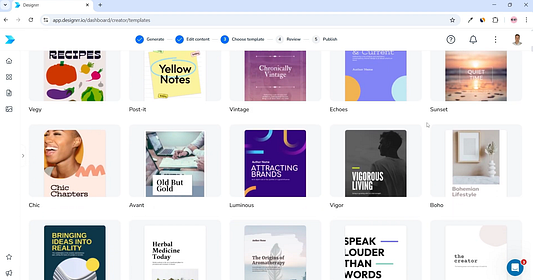
Rather than designing every page yourself, the software automatically applies styling across the entire ebook.
That includes things like:
- chapter pages,
- headings,
- typography,
- spacing,
- page numbering,
- and the table of contents.
This immediately makes the document feel much closer to a finished product.
Instead of worrying about dozens of formatting decisions, you’re refining an existing design.
For most people, that’s a much faster workflow.
The Interior Is Where Designrr Really Shines
Before testing the software, I assumed the AI would be the biggest selling point.
After using it, I changed my mind.
The formatting impressed me more.
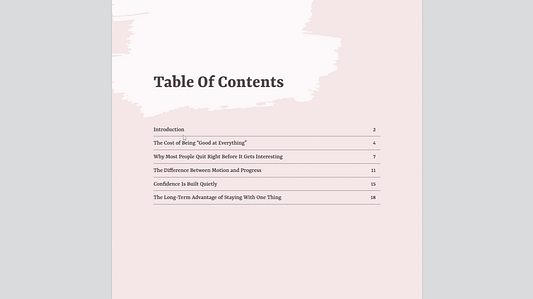
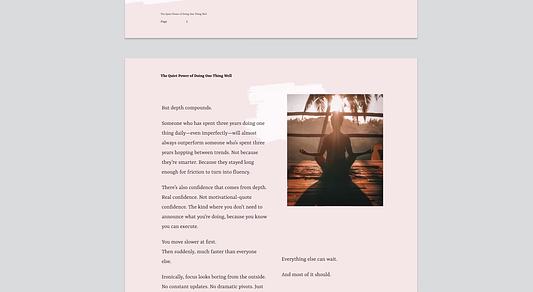
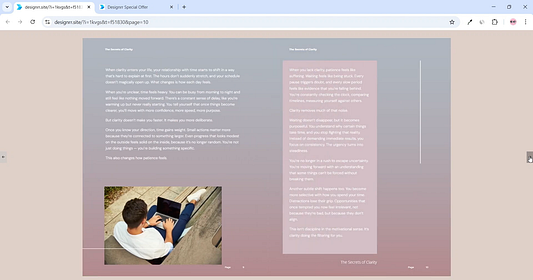
The interior pages already looked surprisingly polished without requiring much work from me.
Things like chapter separation, heading hierarchy, page spacing, and the overall flow felt consistent throughout the document.
Anyone who’s tried formatting a long ebook manually inside Google Docs knows how easy it is for fonts, spacing, or headings to become inconsistent after dozens of pages.
Designrr removes almost all of that busywork.
That was probably the biggest productivity gain I noticed during testing.
The Covers Are Good — But They’re Not Why I’d Buy Designrr
If I had one criticism of the design side, it’d be the covers.
They’re perfectly usable.
Some look quite good.
But I don’t think they’re the strongest part of the software.
If I wanted a modern-looking ebook cover that matched my personal branding, I’d still build it in Canva.
Then I’d simply import it into Designrr.
That sounds like extra work, but in reality it only adds a few minutes while giving you much more creative freedom.
For me, the ideal workflow would be:
- Generate or import the content in Designrr.
- Format the interior in Designrr.
- Design the cover separately in Canva.
- Export the finished ebook.
That gives you the best of both worlds.
You Aren’t Locked Into the Template
One thing worth mentioning is that choosing a template doesn’t freeze your design.
It’s simply your starting point.
After applying it, you can still edit:
- fonts,
- colors,
- headings,
- images,
- page elements,
- and other styling options.
That’s exactly how templates should work.
They save you from starting with a blank page while still leaving enough flexibility to match your own branding.
For lead magnets and digital products, I think Designrr strikes a good balance between speed and customization.
Editing an Ebook Inside Designrr
After the content has been generated or imported, you’ll probably spend most of your time inside Designrr’s editor.
Fortunately, that’s also one of the easiest parts of the software to learn.
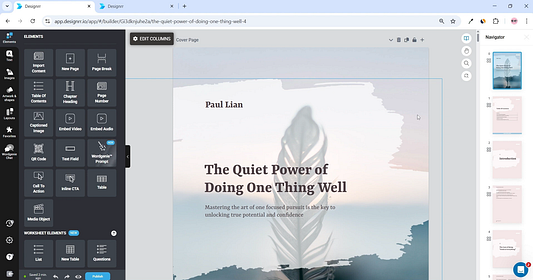
The editor isn’t trying to be Adobe InDesign.
That’s obvious within a few minutes.
Instead, it focuses on making everyday editing as simple as possible.
You click directly into the page, make your changes, and immediately see the result.
For most ebook creators, that’s exactly what you want.
Editing Feels Familiar
If you’ve ever used a visual website builder or a page editor, you’ll feel comfortable almost immediately.
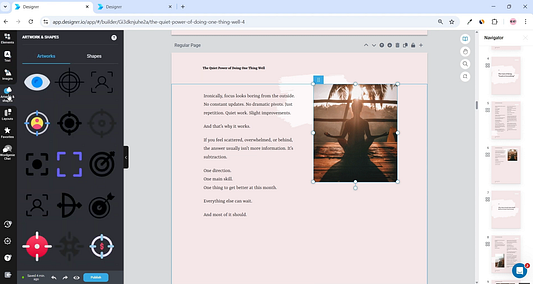
Making changes is straightforward.
You can edit:
- text,
- headings,
- images,
- colors,
- fonts,
- layout elements,
without hunting through complicated menus.
That makes it approachable even if you’ve never designed an ebook before.
AI Doesn’t Eliminate Editing
One thing I want to make clear — because I think some sales pages overpromise — is that WordGenie doesn’t remove the editing stage.
I still spent time:
- rewriting awkward wording,
- deleting repetitive sentences,
- improving headings,
- checking facts,
- making sections sound more like a human wrote them.
That’s not really criticism.
It’s just how AI writing works today.
Whether you use ChatGPT, Claude, Gemini, or WordGenie, the best results still come from treating AI as a first draft — not the final version.
WordGenie Stays Available
One feature I genuinely liked is that WordGenie doesn’t disappear after generating the ebook.
If you’re halfway through editing and decide a paragraph could be improved, you can still use AI without leaving the editor.
That creates a much smoother workflow than constantly copying text into another AI chatbot before pasting it back into your ebook.
It’s a small feature, but after using it I appreciated having everything in one place.
Consistent Formatting Saves More Time Than AI
This might sound strange after spending so much time talking about WordGenie, but here’s my biggest takeaway.
The AI wasn’t what saved me the most time.
The formatting did.
Keeping fonts, headings, spacing, page numbers, and chapter styling consistent across a long ebook normally requires a surprising amount of manual work.
Designrr handles most of it automatically.
That’s the feature I’d miss most if I went back to creating ebooks manually.
It’s Not Trying to Replace InDesign
If you’re expecting pixel-perfect publishing software with unlimited design control, you’ll probably be disappointed.
Designrr simply isn’t built for that.
It’s designed to produce clean, professional-looking ebooks quickly.
Personally, I think that’s the right trade-off.
I’d rather finish an ebook in a fraction of the time than spend hours adjusting tiny layout details most readers will never notice.
Designrr Export Options
Once you’re happy with the finished ebook, the final step is exporting it.
For me, this is where everything comes together.
An ebook isn’t useful until you can actually publish it.
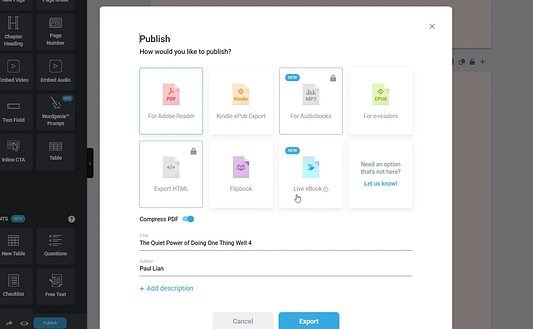
PDF Export
This is the format most people — including me — will probably use.
Whether you’re creating:
- lead magnets,
- downloadable guides,
- client resources,
- digital products,
PDF remains the standard.
After exporting my ebook, everything looked exactly as I expected.
The formatting stayed consistent.
Chapter pages remained intact.
The table of contents worked correctly.
Nothing unexpected broke during export.
Honestly, that’s exactly what I wanted to see.
EPUB and Kindle
If you’re planning to publish ebooks beyond PDFs, Designrr also supports EPUB and Kindle exports.
That’s useful if you’re writing books for wider distribution instead of downloadable lead magnets.
Just remember that export options depend on the plan you’re using.
If Kindle publishing is one of the main reasons you’re considering Designrr, make sure the version you’re buy includes those formats before purchasing.
Flipbooks and Other Formats
Higher plans also include additional publishing formats like:
- interactive flipbooks,
- HTML publications,
- audiobooks.
Those won’t matter to everyone.
Personally, PDF covers almost everything I create.
But if your business depends on publishing the same content in several different formats, those extra exports could easily justify moving beyond the Standard plan.
My Thoughts
The export process itself was exactly what I hoped for.
Simple.
Fast.
Reliable.
There aren’t dozens of complicated settings to configure.
You finish the ebook, choose your format, and export it.
For software aimed at creators rather than professional publishers, I think that’s the right approach.
Designrr Pricing Explained
Pricing is probably the most confusing part of buying Designrr.
Not because it’s expensive.
Because there are two different ways to purchase it.
Depending on where you land, you’ll see:
- monthly subscriptions,
- lifetime licenses,
- optional upgrades.
If you’re researching Designrr for the first time, it’s easy to assume they’re all different products.
They’re not.
Once I understood how everything fit together, the pricing made much more sense.
Monthly Subscription Plans
If you’d rather pay monthly, Designrr currently offers four plans.
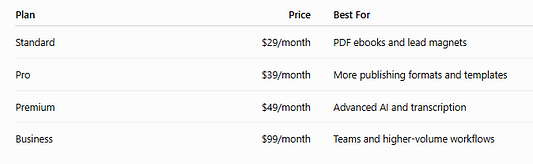
Each tier unlocks additional functionality rather than simply increasing limits.
If Designrr becomes part of your daily workflow, a subscription may make sense.
For most individual creators, though, I think the lifetime option is the more interesting purchase.
The $27 Lifetime Deal
This is the version most people are searching for.
Instead of paying every month, you pay once and receive lifetime access to the Standard version included with that promotion.
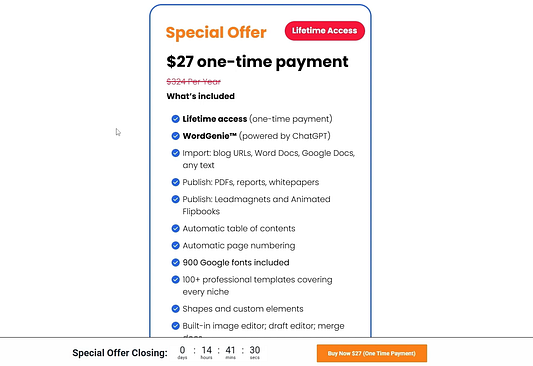
If your workflow mainly involves:
- PDF ebooks,
- lead magnets,
- guides,
- reports,
- checklists,
- digital downloads,
I honestly think that’s enough.
After using Designrr, I wouldn’t feel like I was missing anything essential for that type of work.
What About the Upsells?
This is where many buyers become frustrated.
Immediately after purchasing the lifetime version, you’ll usually see several upgrade offers.
At first, I can understand why people dislike this.
It feels like you’ve just bought the software and now you’re immediately being asked to buy more.
But after looking more closely, I don’t actually think the upsells are the problem.
The problem is expectations.
The Standard version continues working perfectly fine if you decline every upgrade.
The upgrades simply unlock additional functionality.
Whether they’re worth buying depends entirely on what you’re trying to create.
If you’re building simple PDF lead magnets, I’d ignore them.
If your business depends on Kindle publishing, transcription, interactive publications, or more advanced AI tools, then they’re worth considering.
That’s a much better way to think about it than assuming you need every upgrade because it’s offered.
Which Plan Would I Buy?
This is actually the easiest part.
If I were buying Designrr today, I’d start with the Standard lifetime version.
I’d only upgrade after reaching a point where I genuinely needed features that weren’t included.
That’s generally how I buy software anyway.
It’s much easier to upgrade later than pay for features that never become part of your workflow.
Designrr Standard vs Pro vs Premium
One thing I appreciate is that the higher plans don’t simply increase limits.
They expand what the software can actually do.
Here’s how I’d think about each version.
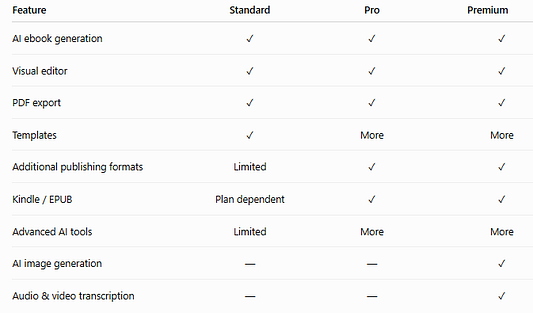
(Always verify the latest plans before purchasing, as features occasionally change.)
Standard
This is the version I’d recommend to most readers.
If you’re creating:
- lead magnets,
- ebooks,
- reports,
- checklists,
- downloadable PDFs,
I think Standard offers the best value.
It’s the plan I’d personally buy first.
Pro
Pro starts making sense when you’re publishing more frequently or need additional publishing flexibility.
If you’re creating ebooks for clients or distributing content across several platforms, the extra publishing features become more valuable.
Otherwise, I wouldn’t upgrade simply because the option exists.
Premium
Premium is aimed at creators who repurpose lots of content.
If you regularly work with:
- YouTube videos,
- podcasts,
- interviews,
- online courses,
the transcription and additional AI tools may save enough time to justify the higher price.
If not, there’s a good chance those features will sit unused.
Designrr Pros and Cons
No software is perfect.
After creating an ebook from beginning to end, here’s what stood out most to me.
Pros
It removes a huge amount of formatting work
This ended up being my favorite part of Designrr.
The AI was useful.
The automatic formatting saved me more time.
Creating chapter pages, page numbers, heading styles and a table of contents manually becomes surprisingly tedious on larger ebooks.
Designrr handles most of it automatically.
WordGenie solves the blank-page problem
Starting is often the hardest part of writing.
WordGenie doesn’t produce a perfect ebook.
What it does produce is a structured first draft that’s much easier to improve than a blank document.
Repurposing content is incredibly easy
This feature deserves more attention than it usually gets.
If you’ve already written blog posts, guides, or YouTube scripts, you don’t have to start over.
Import them.
Apply a template.
Export.
For many creators, that’ll become the primary workflow.
The learning curve is small
I never felt lost.
The workflow is logical.
Every step naturally leads into the next.
Even beginners should be comfortable after a short time.
Cons
AI still requires editing
Probably the biggest misconception surrounding Designrr.
No, it won’t write a perfect ebook.
I still rewrote sections, improved headings and checked facts before I’d publish anything.
Pricing takes a few minutes to understand
Monthly plans.
Lifetime offers.
Upsells.
Different feature tiers.
It’s all manageable once you understand it, but I do think Designrr could explain this more clearly.
Some features depend on your plan
This isn’t unusual software pricing.
But it does mean you shouldn’t assume every screenshot you see online applies to the version you’re buying.
Cover templates aren’t my favorite
The interiors impressed me much more.
Personally I’d still create my covers in Canva.
Designrr vs Canva
This is probably the comparison I see most often.
After using Designrr, I honestly don’t think it’s the right comparison.
They’re designed for different jobs.
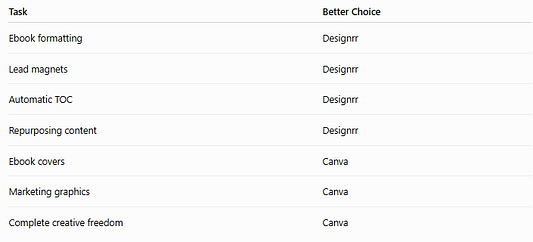
During my testing, Designrr consistently won whenever long-form formatting was involved.
Canva still wins for visual design.
That’s why I wouldn’t replace one with the other.
I’d use both.
Designrr for the inside.
Canva for the cover.
That’s become my preferred workflow after testing both.
Best Designrr Alternatives
Although I think Designrr is one of the better ebook creation tools I’ve used, it isn’t the only option.
The best alternative depends entirely on what you’re trying to accomplish.
If your goal is writing novels, I’d recommend something different than if you’re creating lead magnets for your business.
Here’s how I see the main alternatives after comparing them.
Canva — Best for Design Freedom
If visual design is your highest priority, Canva is still difficult to beat.
It’s excellent for creating:
- ebook covers,
- workbooks,
- planners,
- journals,
- presentations,
- marketing materials.
Where Canva struggles is long-form formatting.
You won’t get automatic chapter pages, tables of contents, page numbering, or consistent ebook layouts without doing most of that work yourself.
That’s exactly where Designrr saves time.
If someone asked me which tool I’d rather use for formatting a 70-page ebook, I’d choose Designrr every time.
Atticus — Best for Authors
If you’re writing books rather than marketing lead magnets, Atticus is worth considering.
It’s designed specifically for authors who need professional manuscript formatting.
I would choose Atticus if my primary business involved publishing novels or nonfiction books.
I would choose Designrr if I wanted to create:
- lead magnets,
- client guides,
- downloadable PDFs,
- digital products.
Those are different workflows.
Beacon — Best for Lead Generation
Beacon focuses heavily on marketing.
Instead of trying to become a complete ebook platform, it specializes in turning existing content into lead magnets that help collect email subscribers.
If list building is your primary objective, Beacon deserves a look.
If you’re looking for a broader ebook creation platform with AI and multiple publishing options, I think Designrr offers more flexibility.
Flipsnack & FlipHTML5 — Best for Interactive Publications
If your readers will consume everything online instead of downloading PDFs, dedicated flipbook platforms have an advantage.
They’re built specifically for interactive publications and website embedding.
Designrr includes flipbooks in some plans, but if interactive publishing is your entire business, I’d probably use software built specifically for that purpose.
Google Docs or Microsoft Word — Best Free Option
If your budget is zero, you absolutely can create ebooks using Google Docs or Microsoft Word.
That’s exactly how many creators start.
The downside is time.
Everything becomes manual.
You’ll create the table of contents yourself.
You’ll manage heading styles.
You’ll fix spacing.
You’ll troubleshoot formatting issues.
You’ll adjust page numbering.
None of those tasks are particularly difficult.
They’re simply repetitive.
That’s the problem Designrr solves.
Which Alternative Would I Choose?
If I wanted complete design freedom, I’d use Canva.
If I were publishing books professionally, I’d choose Atticus.
If I wanted interactive online publications, I’d use Flipsnack.
If I wanted a completely free workflow, I’d stick with Google Docs.
But if my goal was producing professional ebooks, lead magnets, and digital products as efficiently as possible, I’d still choose Designrr.
It combines AI assistance, automated formatting, and publishing tools into one workflow, which ultimately saves more time than trying to piece everything together across multiple applications.
Is Designrr Legit?
Yes.
After using Designrr myself, I have no doubts that it’s a legitimate product.
More importantly, it delivers what it promises.
I was able to:
- generate an ebook,
- edit it inside the visual editor,
- apply professional templates,
- export the finished document,
without running into anything that made me question the software itself.
That doesn’t mean it’s perfect.
It simply means it performs the job it advertises.
And that’s a distinction I think matters.
It’s Been Around Long Enough to Earn Trust
Another reason I have confidence in recommending Designrr is that it isn’t a brand-new AI startup.
It’s an established product that’s been used for years by marketers, agencies, coaches, authors, and digital product creators.
That’s important.
Software comes and goes constantly.
I generally feel more comfortable recommending tools with a proven track record than products that appeared six months ago with ambitious marketing claims.
Set the Right Expectations
The biggest mistake I see people make is expecting Designrr to completely replace writing and design.
It won’t.
You’ll still edit AI-generated content.
You’ll probably customize templates.
You may even design your cover elsewhere.
None of those things mean the software failed.
They’re simply part of creating a high-quality ebook.
I actually trust software more when it saves me hours of work instead of pretending it can eliminate the entire creative process.
What About the Lifetime Deal?
Another common question is whether the lifetime offer is genuinely lifetime.
Based on my experience, yes.
Just remember that you’ll probably see upgrade offers afterwards.
Those upgrades don’t replace your purchase.
They simply unlock additional functionality.
Your Standard lifetime license continues working whether you buy them or not.
Final Verdict: Is Designrr Worth It?
After creating an ebook from start to finish, I think Designrr succeeds because it focuses on solving a very specific problem.
It doesn’t try to become Photoshop.
It doesn’t try to become Adobe InDesign.
It doesn’t promise perfect AI writing.
Instead, it helps you move from raw content to a professional-looking ebook much faster than doing everything manually.
That’s exactly what I wanted it to do.
The biggest surprise wasn’t WordGenie.
It was the formatting.
Watching chapter pages, page numbers, typography, headings, and the table of contents come together automatically saved me considerably more time than I expected.
Buy Designrr If…
I’d recommend Designrr if you regularly create:
- lead magnets,
- ebooks,
- downloadable PDFs,
- client resources,
- reports,
- digital products.
You’ll benefit most if you already create content and simply want a faster way to package it professionally.
You Might Want to Skip It If…
I probably wouldn’t recommend Designrr if:
- you expect AI to produce a publish-ready ebook,
- you need complete publishing control like Adobe InDesign,
- your work is primarily graphic design,
- you only expect to create one ebook.
Those situations simply fall outside Designrr’s strengths.
My Recommendation
For most readers, I’d start with the Standard lifetime plan.
Only move to Pro or Premium once you genuinely need the additional publishing formats, transcription features, or advanced AI tools.
Personally, I’d rather upgrade later than pay upfront for features I may never use.
If you’re creating ebooks, lead magnets, or digital products, I think it’s the best place to start.
My Overall Rating
- Ease of Use⭐⭐⭐⭐⭐
- AI Content Generation⭐⭐⭐⭐☆
- Ebook Formatting⭐⭐⭐⭐⭐
- Templates⭐⭐⭐⭐☆
- Design Flexibility⭐⭐⭐⭐☆
- Value for Money⭐⭐⭐⭐⭐
- Learning Curve⭐⭐⭐⭐⭐
Overall Rating: 4.8 / 5
Designrr isn’t trying to replace every writing or design tool you own.
Instead, it focuses on one thing:
Helping you create professional-looking ebooks faster.
After testing the complete workflow myself, I think it does that very well.
Frequently Asked Questions
Is Designrr worth it?
If you regularly create ebooks, lead magnets, or downloadable digital products, I think so.
After using it myself, the biggest value wasn’t the AI — it was the amount of formatting work the software removes. WordGenie gives you a solid first draft, while Designrr handles much of the repetitive work that normally goes into turning that draft into a polished ebook.
Does Designrr offer a lifetime deal?
Yes.
Designrr offers both monthly subscriptions and a promotional lifetime purchase option, often available as the $27 Standard lifetime deal.
After purchasing, you’ll usually see optional upgrades, but they’re exactly that — optional. Your lifetime license continues working whether you buy additional features or not.
Can Designrr create Kindle ebooks?
Yes.
Depending on your plan, Designrr supports Kindle-compatible exports alongside PDF and EPUB formats.
If Kindle publishing is important to you, double-check that your chosen plan includes those export options before purchasing.
Is Designrr better than Canva?
I don’t think they’re direct competitors.
I’d use Designrr to create and format the ebook itself.
I’d use Canva to design the cover and other graphics.
After testing Designrr, I actually think the two tools work better together than separately.
Does Designrr use AI?
Yes.
Designrr includes WordGenie AI, which can generate ebook outlines and first drafts based on your prompts.
During my test, it produced a structured draft in around five minutes.
Just don’t expect one-click publishing.
Like every AI writing tool I’ve used, the output still benefits from editing before you publish it.